 Authored by:
Padraig Reilly
Authored by:
Padraig Reilly
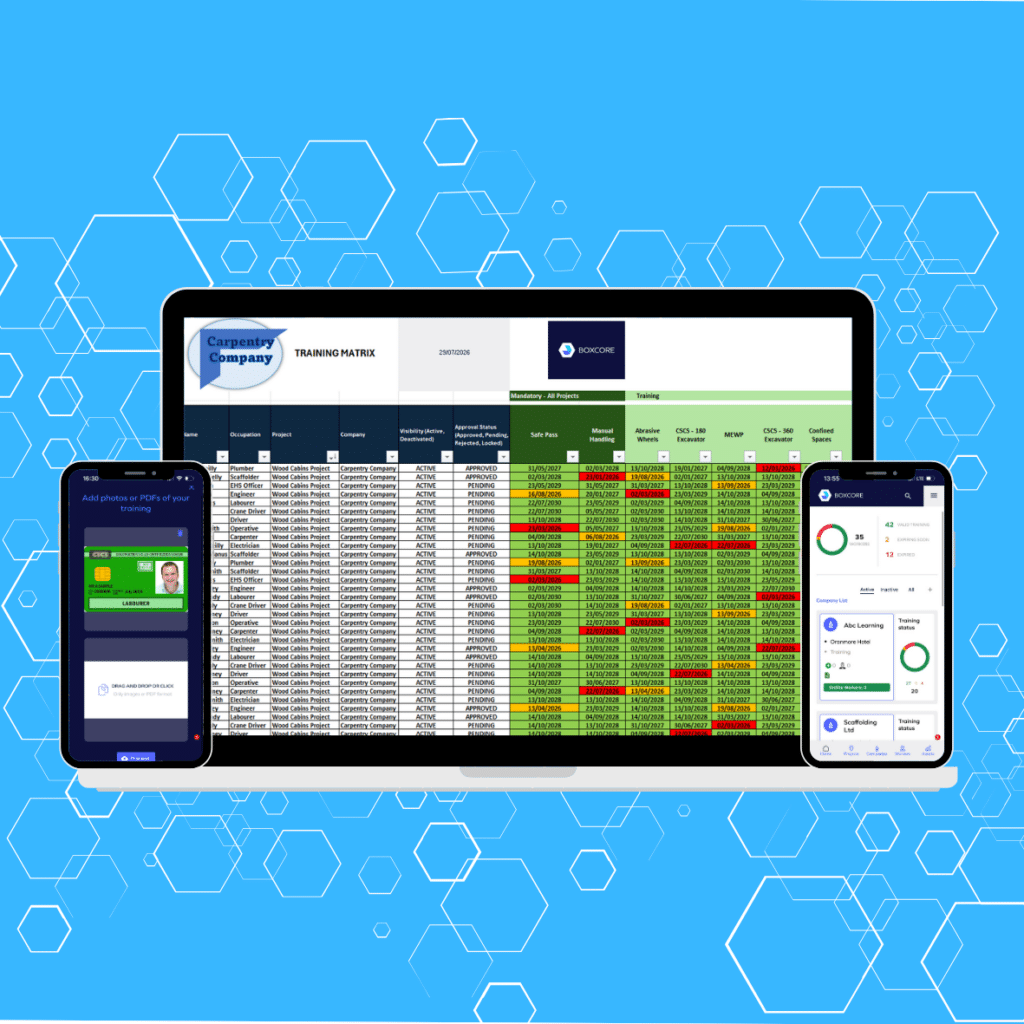
Training matrix software is now a core requirement for construction companies managing growing compliance demands, larger workforces, and increasingly complex project environments. Whether operating in Ireland with Safepass requirements, the UK with CSCS cards, or across the US with OSHA cards and project-specific orientations, contractors need a clear, reliable way to track who is qualified to do what, and when.
A key point that is often underestimated is task specific training. It is no longer enough to confirm a worker holds a valid card or qualification. Contractors must be able to demonstrate that each worker is trained for the exact tasks they are carrying out on a specific project. This applies across every region and is becoming a major focus during audits and client reviews.
The challenge is not a lack of systems. It is choosing one that actually works on site.
Too many platforms look strong in a demo but fail when rolled out across busy projects with subcontractors, language barriers, and tight deadlines. The result is familiar: spreadsheets kept on the side, gaps in training visibility, and constant chasing of paperwork.
This guide breaks down five practical things to look for when selecting training matrix software for construction, with a clear emphasis on how task specific training is managed in real-world project environments.
Construction projects now demand far more than basic compliance tracking.
Across all regions, contractors must manage:
Task specific training is where many systems fall short. A worker may have valid general training, but that does not confirm they are competent to carry out a particular activity such as lifting operations, confined space entry, or working at height on a specific project.
Without a structured system, this becomes difficult to track and even harder to prove.
Boxcore addresses this by bringing all training, document, and workforce data into a single system, allowing teams to check compliance and task suitability in seconds rather than relying on fragmented records .
Ease of use is still the deciding factor in whether a system succeeds or fails.
Construction teams are under pressure. They do not have time to navigate complex systems just to confirm whether someone is trained for a specific task.
This becomes even more important when managing task specific training. If training matrix software is not simple, site teams will not use it to check whether a worker is approved for a particular activity.
A site manager should be able to check, within seconds:
Boxcore is designed so that frontline teams can access this information instantly from any device, without needing to search through multiple systems .
If checking task-specific competence takes too long, it will not be done consistently.
That creates risk:
Ease of use ensures task specific training is checked as part of daily site activity, not just during formal reviews.
When managing large workforces, clarity is critical.
A traffic light system provides instant visibility of training status, including task specific requirements.
For example:
Boxcore enables teams to quickly identify whether training is in date and where gaps exist, helping prevent issues before they arise .
Task specific requirements vary by region:
A traffic light system that reflects these layered requirements makes it easy for teams to stay on top of compliance.
Despite advances in technology over the past decade systems, most construction teams spend endless hours weekly trying to manually track information using excel. The best solution eliminate the need to manually update on excel but give users the abilty to easily export info on Excel.
Clients, auditors, and project stakeholders often request training matrices in spreadsheet format, including task specific training records.
Many systems can export basic training data but fail to include task-level detail.
This creates problems when:
Boxcore allows safety data to be shared instantly, removing the need to manually compile reports and ensuring task-specific records are included .
A training matrix should not just store data. It should actively identify what is missing.
This is where task specific training becomes critical.
Ireland
UK
USA
Across all regions, the trend is clear: general certification is only the starting point.
Boxcore ensures that training records are continuously updated and checked against requirements, helping teams avoid situations where workers are missing critical task-specific qualifications .
Without this functionality:
With it:
Roles define training requirements, but tasks define what actually happens on site.
A strong system must link both.
For example:
Boxcore connects training data with workforce management, ensuring that only workers with the correct training and approvals are allowed on site where required .
When linked with facial recognition access control:
This creates a closed-loop system where training, onboarding, and site access are fully aligned.
Inductions and orientations are no longer generic.
They are increasingly tailored to:
In the US, this is particularly important where project-specific orientations are mandatory. In Ireland and the UK, site inductions are increasingly being used to reinforce task-specific risks and requirements.
Without this:
With it:
Task specific training is where compliance becomes operational.
It connects directly to what is happening on site, not just what is recorded on paper.
Manual systems struggle with this because:
Digital systems solve this by:
Boxcore removes the need for spreadsheets and disconnected systems by centralising all safety and workforce data, making it easier to manage both general and task-specific training requirements .
A construction company using effective training matrix software should be able to:
Anything less leaves gaps that can impact safety, programme, and compliance.
Training matrix software must go beyond tracking certificates. It needs to reflect the reality of construction work, where task specific training is just as important as general qualifications.
Focus on:
Get these right, and the system becomes part of daily operations rather than an admin burden.
As Padraig Reilly explains:
“At the end of the day, our goal is simple: we want to give contractors tools that actually make their lives easier on site. It’s about cutting down the admin, improving safety and helping teams get the job done with less hassle.”
Book a demo with Boxcore today and see how simple it is to track training, manage compliance, and keep every worker site-ready from day one.
From worker onboarding, training records, compliance tracking, safety documents, equipment management, to on-site time and attendance tracking — Boxcore’s software greatly simplifies construction site safety.